
What is CannyTrack Productivity Monitoring System?
CannyTrack is a comprehensive workforce management and productivity monitoring solution designed to provide managers with real-time visibility into remote employee activities while maintaining transparency and consent. The platform combines activity tracking, optional screenshot capture, app/URL monitoring, and data loss prevention to help organizations optimize workforce utilization, identify productivity bottlenecks, and protect sensitive data.
Built with privacy in mind, CannyTrack operates on a consent-based model where employees are notified of monitoring and have dashboard access to view their own tracking data. The platform offers sensitive data blurring, customizable screenshot frequency, and role-based access controls to balance productivity insights with employee privacy.
Perfect For:
Remote teams, hybrid workforces, BPOs, IT services, customer support centers, distributed teams, and any organization needing to monitor productivity, optimize resource allocation, and prevent data breaches in remote work environments.
Comprehensive Monitoring Features

Activity Tracking
Monitor mouse and keyboard activity with real-time status visibility showing active, idle, and away time.
Screenshot Monitoring
Optional screenshot capture with configurable frequency, sensitive data blurring, and encrypted storage.
App & URL Tracking
Track application usage and website visits with time spent, categorization, and productivity scoring.
Data Loss Prevention
Monitor digital asset movement and critical actions to prevent data breaches and unauthorized transfers.
Productivity Analytics
Real-time dashboards with productivity metrics, team comparisons, and performance trends.
Offline Support
Local data storage during connectivity outages with automatic sync when connection is restored.
Real-Time Activity Tracking & Status Monitoring
CannyTrack provides real-time visibility into employee activity with mouse and keyboard tracking, active/idle time detection, and work status monitoring. Managers see live dashboards showing who's working, who's idle, and who's on break enabling better resource allocation and productivity management.
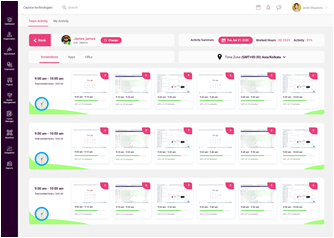
Mouse & Keyboard Activity
Work Status Indicators
Consent-Based Monitoring with Full Transparency
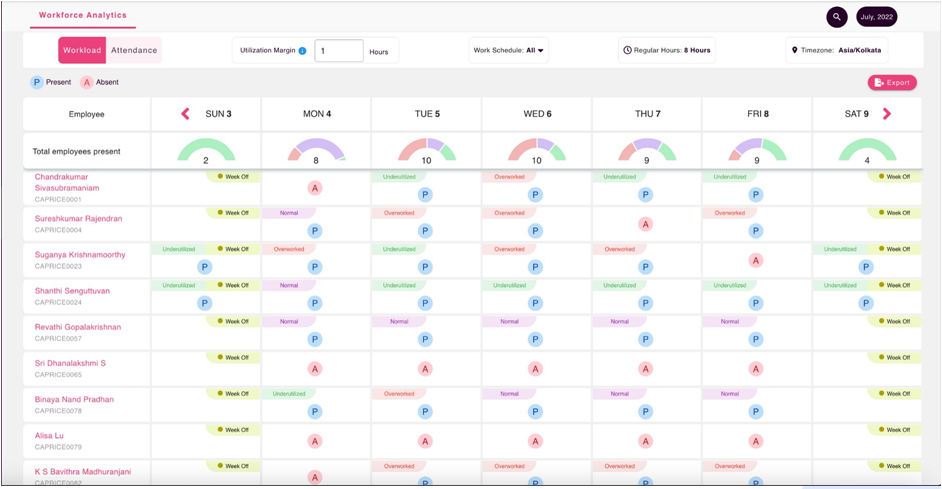
Unlike stealth monitoring tools, CannyTrack operates on a transparent, consent-based model. Employees are notified of monitoring, understand what data is collected, and have dashboard access to view their own tracking data. This builds trust while maintaining productivity accountability.
Employee Notification
Clear notification during software installation. Employees understand what's monitored and why. No hidden or stealth tracking.
Dashboard Access
Employees access their own activity logs, screenshots, and productivity metrics. Full transparency into what managers see.
Privacy Controls
Configurable screenshot blurring for sensitive data. Exclude personal apps and websites from tracking. Privacy-first design.
Business Benefits & Use Cases
Productivity Increase
Average productivity gain from monitoring awareness and accountability
Faster Data Breach Detection
Identify suspicious file transfers and data exfiltration attempts quickly
Reduction in Time Theft
Eliminate unproductive time and ensure billable hours accuracy
Key Business Benefits
1. Optimize Remote Workforce Productivity
Gain visibility into distributed team activities without micromanagement. Identify productivity patterns, peak work hours, and optimization opportunities. Support remote employees with data-driven insights while maintaining work-life balance.
2. Prevent Data Loss & Insider Threats
Monitor critical data movements including file uploads, email attachments, USB transfers, and cloud storage activity. Detect anomalous behavior and potential data breaches before they cause damage. Protect intellectual property and sensitive customer data.
3. Accurate Client Billing & Time Tracking
For agencies and consulting firms, CannyTrack provides precise time logs for client billing. Track project hours, application usage, and deliverable progress. Eliminate billing disputes with screenshot evidence and activity logs.
4. Identify High & Low Performers
Performance analytics reveal top performers and struggling team members. Recognize productive employees, provide targeted coaching to underperformers, and make data-driven decisions about promotions, bonuses, and performance improvement plans.
5. Compliance & Audit Documentation
Maintain comprehensive audit trails for regulatory compliance (SOX, HIPAA, GDPR). Provide evidence of employee activities for compliance audits, security investigations, and legal disputes. Encrypted logs with tamper-proof timestamps.
6. Reduce Operational Costs
Identify software license waste by tracking application usage. Eliminate unnecessary subscriptions and optimize tool allocation. Reduce overtime costs by analyzing actual work hours vs. reported time. Improve resource utilization and project profitability.
Industry Use Cases & Applications
IT Services & BPOs
Challenges: Remote employees, client billing accuracy, data security, productivity accountability
Financial Services & Banking
Challenges: Sensitive data handling, compliance requirements, insider threat prevention
Healthcare Organizations
Challenges: HIPAA compliance, patient data protection, remote healthcare workers
Legal Firms & Consulting
Challenges: Billable hours accuracy, client confidentiality, document security
E-commerce & Customer Support
Challenges: Distributed support teams, performance metrics, quality assurance
Software Development Teams
Challenges: Remote developers, project deadline tracking, code security
Security, Privacy & Compliance Standards
Monitoring employee activity requires the highest security and privacy standards. CannyTrack implements enterprise-grade encryption, access controls, and privacy features to protect both employee and company data.
Data Security & Encryption
Privacy & Employee Rights

About the Author
Christopher - Head of Technical Department & Investor
Christopher leads CannyMinds Technology Solutions' technical innovation and product development. As Head of the Technical Department and a key investor, he oversees the design and implementation of enterprise productivity monitoring solutions, including CannyTrack's consent-based tracking and data loss prevention features. With expertise in workforce analytics, cybersecurity, and privacy-compliant monitoring technologies, Christopher ensures CannyTrack delivers transparent productivity insights while respecting employee privacy and maintaining compliance with global data protection regulations.
Last Updated: March 7, 2026
Product Features & Capabilities (FAQ)
Detailed answers to common technical and operational questions regarding this solution.
CannyTrack is strictly consent-based. It allows organizations to configure monitoring rules (such as blurring sensitive information in screenshots or restricting monitoring to specific working hours) to balance productivity tracking with employee privacy.
Yes, administrators can map specific applications and websites to "Productive," "Neutral," or "Unproductive" categories. The system automatically calculates productivity scores based on active time spent in these categorized apps.
Identifying burnout involves tracking high, sustained levels of active work hours beyond regular schedules, an absence of idle breaks, and sudden drops in application output compared to historical baselines. Productivity monitoring can flag these leading indicators early.
Organizations like banks, defense contractors, and healthcare providers face strict data sovereignty requirements (like GDPR or HIPAA). On-premise deployments ensure that sensitive screen recordings and employee activity data never traverse external vendor networks.
The DLP module monitors and flags unauthorized attempts to move data, including large file uploads to personal cloud storage (e.g., Google Drive, Dropbox), USB drive transfers, and sending attachments via personal webmail.
The productivity score aggregates total active hours, time spent in applications categorized as "Productive," and idle time ratios. This provides supervisors with an objective baseline to compare team efficiency across different locations or departments.
Ready to Boost Team Productivity?
Monitor remote workforce productivity with transparent, consent-based tracking. Get real-time insights, prevent data loss, and optimize team performance with CannyTrack. Request a demo today.
Trusted by 100+ organizations monitoring 2,000+ users